---
title: Configuring your Reps' Voicemail Drops
description: With the Voicemail Drops feature, Reps can pre-record voicemail messages that they can drop to prospects' voicemail boxes as they encounter them without staying on the line.
---
[Skip to content](https://support.sellfire.com/configuring-reps-scripts#main-content)
[](https://sellfire.com)
Open main navigation
Close main navigation
Search the Knowledge Base
- There are no suggestions because the search field is empty.
1. [Sellfire Help Center](https://support.sellfire.com/?hsLang=en)
2. [Enablement Configurations](https://support.sellfire.com/enablement-configurations?hsLang=en)
# Configuring your Reps' Voicemail Drops
Configure the scripts that you would like your team to use for their *Voicemail Drops*.
### Voicemail Drops
With the *Voicemail Drops* feature, Reps can pre-record voicemail messages that they can drop to prospects' voicemail boxes as they encounter them without staying on the line. This allows Reps to move quickly to their next activity while their voicemail is added to the prospects' voicemail boxes in the background. Since leaving voicemails can make up a large percentage of total call results, the efficiency gains from using this feature allow Reps to spend a ton more time focused on other pipeline activities.
Enablement users are able to create scripts that Reps can use to create their *Voicemail Drops* by navigating to *System Configuration \> Templates and Automation \> Script Management*.
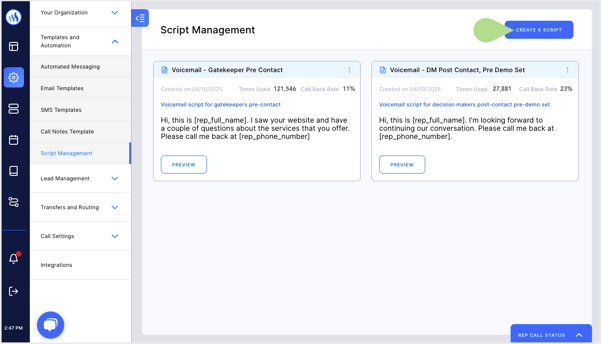
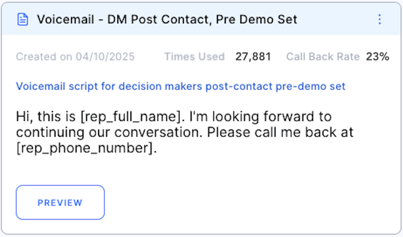
After you have created your scripts and Reps use them to create their *Voicemail Drops*, in the specific script tile, you will be able to see the total number of times Reps have used drops associated with that script and the percentage of time that Reps have received an inbound call from those prospects after dropping that voicemail.
#### **Rep experience**
Click [here](https://support.sellfire.com/rep-call-results-scheduling-events?hsLang=en#:~:text=the%20correct%20times.-,Voicemail%20drops,-When%20you%20encounter) to learn how Reps can setup and use *Voicemail Drops*.
- [Getting Started](https://support.sellfire.com/getting-started?hsLang=en)
- [Rep Guide](https://support.sellfire.com/rep-guide?hsLang=en)
- [Leads](https://support.sellfire.com/leads?hsLang=en)
- [Enablement Configurations](https://support.sellfire.com/enablement-configurations?hsLang=en)
- [Integrations and Plug-ins](https://support.sellfire.com/integrations-and-plug-ins?hsLang=en)
[](https://www.Sellfire.com)
© 2026 Sellfire. All Rights Reserved.
Support Hours
Mon-Fri 9:00 AM-5:00 PM CT
Excluding US federal holidays